I have tracked my dividends and stocks in spreadsheets for years. Not one spreadsheet. Several. I have spreadsheets for my spreadsheets, which is either a sign of deep financial discipline or a quiet cry for help, and I have made peace with not knowing which.
So when someone asks me for the best dividend tracker app, my first reaction is a raised eyebrow. Then I remember that most normal people would rather not spend a Sunday afternoon arguing with a formula, and that is fair. Life is short. Cell references are long.
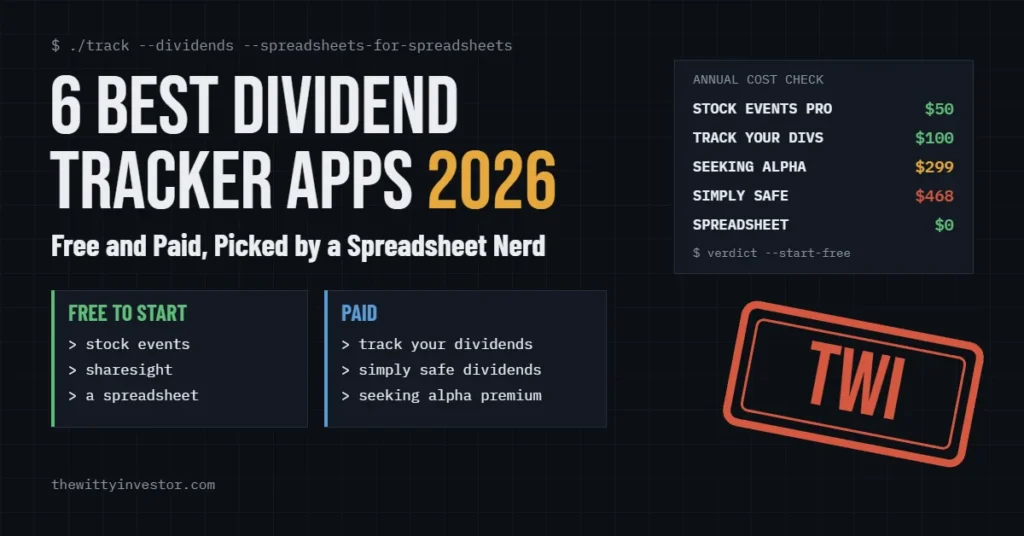
This is my list of the six dividend trackers worth your time in 2026, sorted by the question you are actually trying to answer: when you get paid, whether the payout is safe, what you owe in taxes, or what to buy next. One of the six is a spreadsheet. I am not even sorry.
No affiliate links in this roundup. This is not an “I tested 47 apps for 90 days” post. Prices and features come from each company’s own pricing page, checked in late October 2026, and they will drift, so confirm before you pay. More about how I review.
Why a Spreadsheet Guy Is Writing About Apps
My goal is simple to say and slow to reach: at least $1,000 a month in dividends. I am not there yet. I am getting there the way most regular people do, which is slowly, one boring quarterly payment at a time, while the internet shows me 23-year-olds who claim they did it in 18 months with a covered-call ETF and a ring light.
My first big win on the way was Chevron. I set a goal for my CVX position, and I got it there. Nobody threw a parade. CNBC did not call. But if you have never felt genuinely proud of a single cell in a spreadsheet, I cannot explain it to you, and honestly I envy you a little.
Here is the math on that goal, because I cannot help myself. $1,000 a month is $12,000 a year. At a 3.5% average yield, that takes about $343,000 invested. At 4%, about $300,000. That is why I have opinions about any app that wants $468 a year. That is $39 a month, nearly 4% of the monthly income I am still building toward, spent on software before a single share gets bought.
So this post answers the question I actually care about: when does an app beat a spreadsheet, and when is it just a spreadsheet with a subscription fee and a logo?
What Are the Best Dividend Tracker Apps?
Here is the short list, with the one job each app does best.
| App | Best for | Cheapest paid plan | Free option | The deciding feature |
|---|---|---|---|---|
| Stock Events | Free calendar and income view | $49.99/year (Pro) | Yes, up to 15 stocks | Clean dividend calendar on a free plan |
| Track Your Dividends | Budget auto-sync | $99.99/year | Yes, 1 linked account | Unlimited linked accounts on Premium |
| Sharesight | Taxes and true performance | $7/month billed annually | Yes, 10 holdings | Dividend and tax reporting across accounts |
| Simply Safe Dividends | Dividend safety | $468/year | Free trial | Dividend Safety Scores |
| Seeking Alpha Premium | Research and ideas | $299/year (list) | No free tier | Dividend grades plus analyst articles |
| A spreadsheet | Total control, $0 | Free | It is the free option | Exactly what you build |
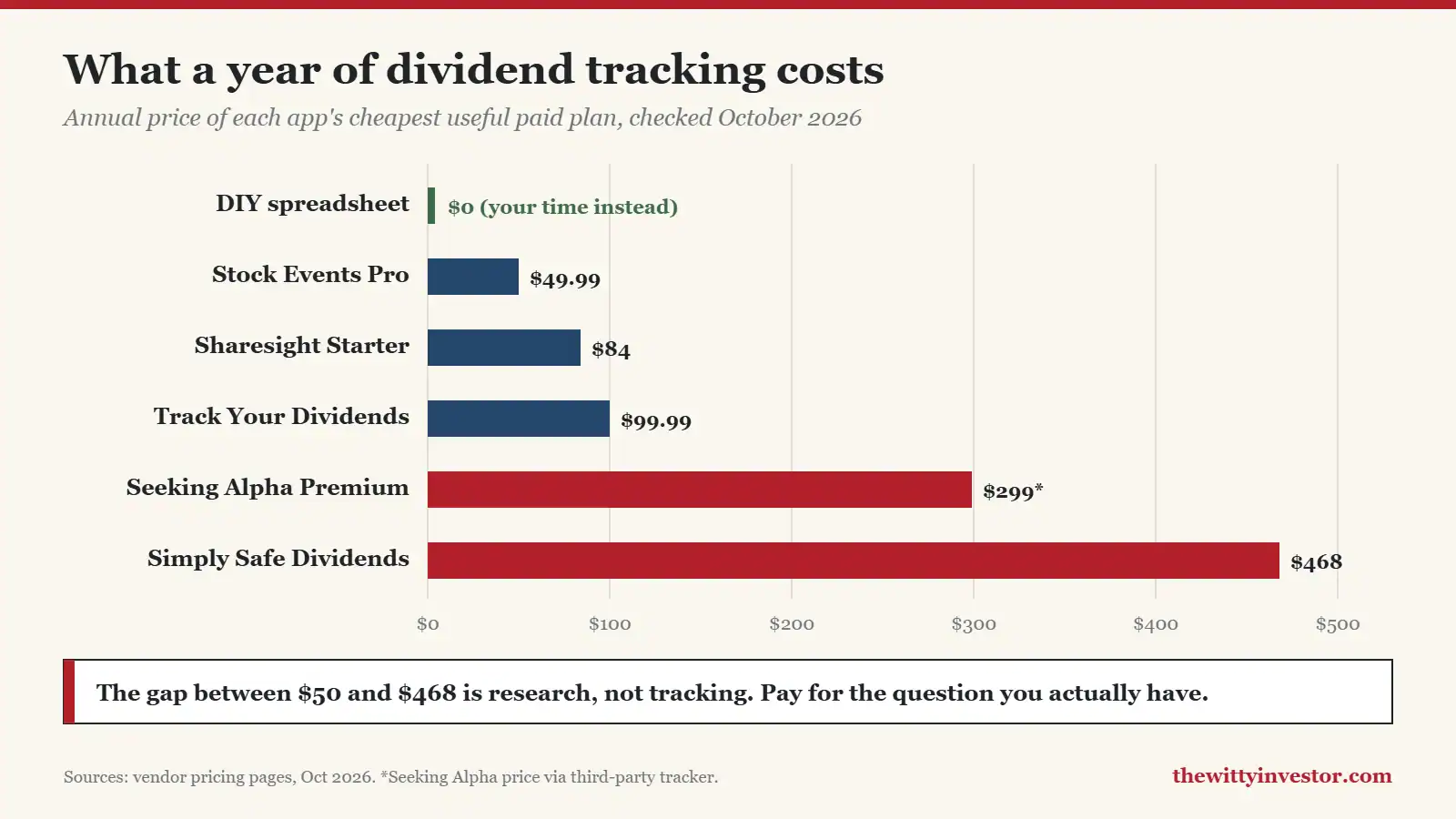
The chart makes the point better than I can. The jump from $50 to $468 is not better tracking. Every app on this list can tell you when you get paid. The expensive ones are selling judgment about whether you should keep getting paid. Those are very different products, and paying for the second when you needed the first is how a dividend portfolio ends up funding a software company’s dividend instead of yours.
The Best Dividend Tracker Apps, Reviewed
1. Stock Events: Best Free Dividend Tracker
Stock Events is the one I would point most people to first, because its free plan does the job most people actually have. You add your holdings, and it shows a dividend calendar, upcoming events and a running view of your portfolio. No formulas. No color-coding. No spreadsheet-for-your-spreadsheet. I find this slightly suspicious, but I am told that is a me problem.
- Free plan covers up to 15 stocks with dividend and event tracking
- Pro unlocks unlimited holdings, portfolio analytics and advanced dividend views
- An optional Connect add-on syncs brokerages, crypto exchanges and wallets automatically
Price: Free for up to 15 stocks. Pro is $49.99 a year with a 7-day trial. Broker sync is a separate add-on on top of that.
- Pro: the free plan is genuinely useful, not a demo wearing a trench coat
- Pro: cheapest paid tier on this list
- Con: the free plan means manual updates, and auto-sync costs extra on top of Pro
- Con: 15 stocks fills up fast if you hold individual names, especially that one stock you bought in 2021 because a podcast said so
2. Track Your Dividends: Best Budget Auto-Sync
Track Your Dividends is built around one idea: pull your holdings from your brokerage accounts and turn them into an income picture without you typing anything. It is the spreadsheet without the spreadsheet. I respect it the way a guy with a stick shift respects an automatic. Fine. Sure. Convenient.
- Free plan includes one linked account and unlimited manual portfolios
- Premium adds unlimited linked accounts that update daily
- Premium also adds its own Dividend Safety Score, a screener and stock analysis
Price: Free, or Premium at $9.99 a month or $99.99 a year. There is a 7-day trial and a 14-day money-back guarantee.
- Pro: unlimited auto-synced accounts for about $100 a year is good value if your money lives in several places
- Pro: the free tier is enough for someone with one brokerage
- Con: its safety score is not the same thing as a dedicated research service, so do not treat it like one
- Con: its pricing page does not list which brokers it connects to, so check yours before you pay
3. Sharesight: Best for Taxes and True Performance
Sharesight is the accountant of the group. It does not care how you feel about your portfolio. It cares what your portfolio actually returned, including dividends and currency effects, which is the number most of us avoid looking at directly, like the sun or our 2022 statements. It tracks dividends and distributions on a very large list of global securities and estimates future income.
- Measures real return with dividends added back, which price charts quietly leave out
- Handles multiple accounts and currencies well
- Tax reporting that splits income the way tax season wants it split
Price: Free for up to 10 holdings. Paid plans start at $7 a month, billed annually. Details are on its pricing page.
- Pro: the best answer here to “what did my dividends actually earn me after everything”
- Pro: handles multiple accounts and currencies well
- Con: the free plan’s 10-holding limit counts closed positions, so it fills up faster than you expect
- Con: tax reports are not on the free plan, and the useful tiers add up to $216 a year or more
4. Simply Safe Dividends: Best for Dividend Safety
Simply Safe Dividends is not really a tracker that happens to do research. It is a research service that happens to track. Its core product is Dividend Safety Scores, which try to answer the only question that matters to an income investor: is this payout about to get cut? Every other app tells you when the check is coming. This one tries to tell you whether it is coming at all.
- Dividend Safety Scores on individual holdings
- Unlimited portfolios with alerts for dividend changes
- Income calendar and forecasting, plus screeners, 10-year financial charts and S&P credit ratings
Price: $468 a year, billed annually only. There is a free trial with no credit card and a 60-day money-back guarantee for first-time subscribers. Auto-renewal is on by default, with a reminder email two weeks before. (Yes, I read the renewal terms. No, nobody else does. That is the business model.)
- Pro: the most direct answer on this list to “is my income safe”
- Pro: 60 days is a real refund window, long enough to sit through a full earnings season
- Con: $468 a year is roughly the annual dividend from $13,000 invested at a 3.5% yield, so on a small portfolio it eats a big share of the income it is protecting
5. Seeking Alpha Premium: Best for Research and Ideas
Seeking Alpha is a research platform with portfolio tracking attached. I have used it. Its draw for dividend investors is the dividend grades, which let you scan a whole portfolio for safety, growth and yield at a glance, plus a mountain of articles on individual companies. It is excellent for ideas. It will also hand you 14 strong opinions about a stock you were perfectly calm about five minutes ago.
- Dividend grades for safety, growth, yield and consistency
- A deep library of articles on individual companies
- Portfolio tracking that surfaces news and grade changes on what you hold
Price: List price is $299 a year, with a 7-day trial and frequent discounts, according to a discount tracker updated October 2026. Seeking Alpha’s own subscription page blocks automated checks, so confirm the price at checkout.
- Pro: the best source here for new ideas and opposing views on a stock you own
- Pro: dividend grades are fast to scan across a whole portfolio
- Con: article quality varies a lot, because a lot of different contributors write it
- Con: it will tempt you to trade more, which is the opposite of what a dividend portfolio needs
6. A Spreadsheet: Best Free Option for Control Freaks (Hi)
This is my pick, and I will not be pretending otherwise. Google Sheets has a built-in GOOGLEFINANCE function that pulls prices. Add your holdings, share counts, dividend per share and payment months, and a simple sheet will tell you your annual income, your yield on cost and your monthly calendar. It costs nothing but an afternoon. In my case, several years of afternoons, and a second spreadsheet to keep track of the first one.
Price: Free. The cost is your time.
- Pro: you own every number, and nobody needs your brokerage login
- Pro: it does exactly what you build, and nothing you did not ask for
- Con: GOOGLEFINANCE pulls prices, not dividend amounts, so you type those in yourself when they change
- Con: it only knows what you tell it. If a company cuts its dividend and you do not update the cell, your spreadsheet will keep cheerfully reporting income that no longer exists. This is fine.
When an App Beats a Spreadsheet (a Reluctant Admission)
It pains me to write this section. I am writing it anyway, because I am a professional, and because I spent years in tech support, and I know that the right tool is the one people will actually use.
- Your money lives in several places. Typing the same holdings in from three brokerages gets old. Auto-sync earns its fee here.
- You want alerts on cuts and changes. The paid tools tell you when a dividend changes, which is a lot faster than finding out from your statement.
- You want true performance. Price charts ignore dividends. A good tracker adds them back, which is the only honest way to judge a dividend strategy.
- Tax time makes you nervous. Your broker still sends the official Form 1099-DIV, but a tracker that splits qualified and non-qualified income makes the year less mysterious.
And when the spreadsheet wins: you have one or two accounts, you like control, you do not want to hand over brokerage logins, and $0 is your favorite price. That has been me for years, and my $1,000-a-month goal is better served by buying shares than buying subscriptions.
How to Choose a Dividend Tracker App
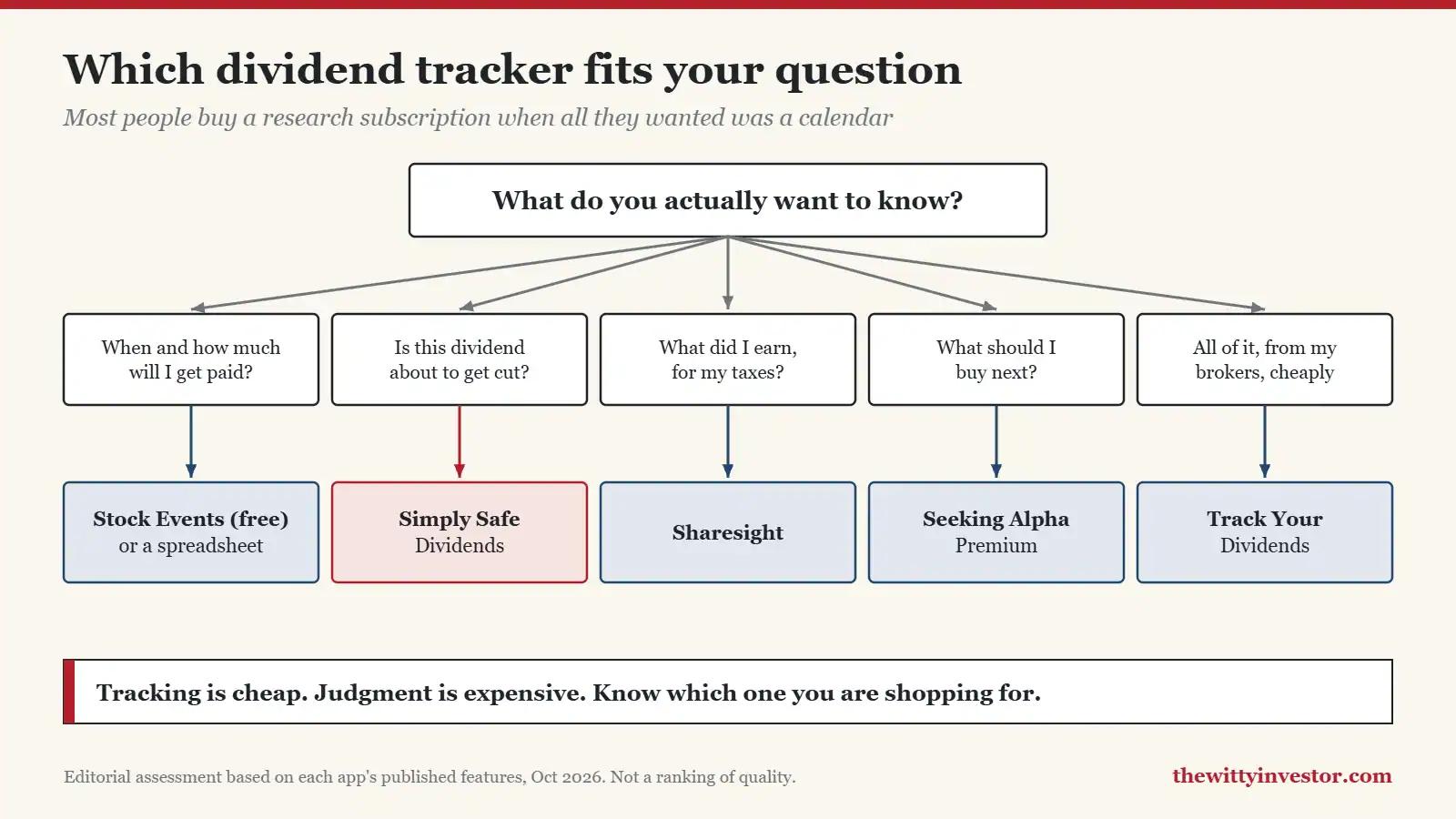
- The question you need answered: a calendar, safety, taxes or new ideas. Pick the cheapest tool that answers yours.
- Data ownership: whether you can get by without handing over brokerage logins, and what happens when you stop paying.
- Refunds: trial length and money-back windows, since annual billing is common in this category.
- Cost relative to income: a $468 tool on a portfolio paying $600 a year is a bad trade, no matter how good the tool is.
A tracker tells you what you are getting. It does not tell you whether the company can keep paying it, and it definitely does not tell you whether you should have bought it. That part is on us. I wrote more about why most income investors miss the point, and if you are still deciding what to own, start with the holdings, not the software: my best dividend stocks for 2026, six dividend ETFs, and the best brokerages for dividend investing. If you want the broker to handle reinvesting for you, my M1 review covers the autopilot option.
Frequently Asked Questions
What is the best free dividend tracker app?
Stock Events, for most people. Its free plan covers up to 15 stocks with a dividend calendar. If you hold more than that and do not mind updating it yourself, a spreadsheet is free with no limit. Ask me how I know.
Is Simply Safe Dividends worth $468 a year?
Only if one dividend cut would cost you more than the subscription. On a large income portfolio, that can easily be true. On a portfolio paying a few hundred dollars a year, it is not.
Can a dividend tracker connect to my brokerage?
Several can. Track Your Dividends links one account free and unlimited accounts on Premium. Stock Events syncs brokerages through its paid Connect add-on. Check that your specific broker is supported before you pay for anything.
Is a spreadsheet good enough to track dividends?
Yes, if you have one or two accounts and will actually update it. The weak spot is cuts and changes: a spreadsheet will not warn you. Put a reminder on your calendar to check payouts each quarter, or pair your sheet with a free app’s alerts.
How much do I need invested to make $1,000 a month in dividends?
About $343,000 at a 3.5% average yield, or about $300,000 at 4%. Higher yields shrink that number on paper, but very high yields are often high because the market expects a cut. Slow and boring is not a bug here. It is the whole strategy.
The Verdict
Start free. Stock Events or a spreadsheet will cover most people, and either one costs exactly nothing. Pay only when an app answers a question your free setup cannot, and keep the subscription small next to the income it is tracking.
As for me, I will be over here in my spreadsheets, inching toward $1,000 a month one quarterly payment at a time. If an app ever does that better than my spreadsheets, I will tell you. I will be grumpy about it, but I will tell you.
Want the next one in your inbox? The Verdict newsletter sends one honest take a week. No hype, no ring light.